How to Pick a Tracing App for iPhone and Android
Updated 2026-11-20
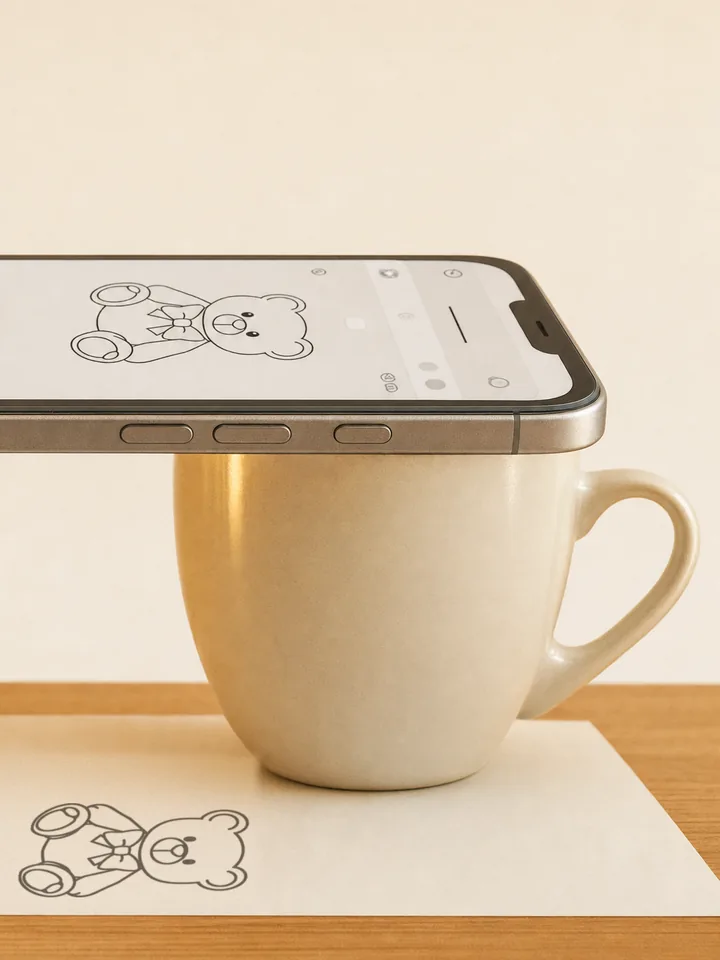
A tracing app shows a picture on top of your phone's camera view of the paper, so the picture looks printed on the page and you draw over it. Prop the phone above the paper, line the picture up, and trace.
There are dozens of tracing apps on the App Store and Google Play. Nearly all are free to download and charge for their full features, and they differ more than their screenshots suggest. Here is what to check before you start a trial, how to trace without paying, and what our own app, Stencly, does and doesn't do.
Three ways a tracing app can work
Most apps offer one or two of these; the best mode depends on what you are drawing:
- Camera overlay. The picture sits over the live camera view of your paper and you trace while watching the screen. It works on any paper, card or canvas, and in a bright room. The phone has to stay still, so it needs a stand or something to prop it on.
- Lightbox. The picture is shown on the screen itself, and you lay thin paper over the phone and trace the lines that show through. The quickest set-up, but limited to paper thin enough to see through and drawings the size of the screen.
- AR (anchored). The app pins the picture to the paper, so it stays lined up even when the phone moves a little. Many apps call any camera overlay “AR drawing”, so check whether the picture really stays put.
What to check before you pay
The screenshots all look alike. These are the differences that matter once you start drawing:
- Your own photos. Some apps only let you trace their templates for free, or limit how many of your own pictures you can use.
- Photo to outline. A photo is hard to trace; clean lines are easy. An app that turns a photo into an outline saves a lot of squinting.
- Controls. Opacity (so you can see your pencil through the picture), size, a mirror or flip control, and a lock that stops a stray tap from moving the picture once it is lined up.
- Lessons. If you want to learn to draw rather than copy, some apps include drawing lessons; others, Stencly among them, are tracing tools only.
- How it charges. Weekly subscriptions are common for tracing apps, and weekly prices vary a lot from app to app. Check the price on the paywall before you start a trial, and look for a one-time purchase if you will use the app for months.
Is there a free tracing app?
Most tracing apps are free to download but keep their full features behind a paid plan. Two ways to trace without paying:
- Stencly's Camera and Lightbox modes are free to use, with the free templates and your first three photos of your own.
- Any phone works as a lightbox with no app at all: open the picture in your photo viewer, turn the brightness up, and trace through thin paper laid on the screen. How to do it without scratching the screen: how to use your phone as a lightbox.
iPhone, iPad and Android
Camera and lightbox tracing work on any phone or tablet with a rear camera and a screen. AR modes use Apple's ARKit on iPhone and iPad and Google's ARCore on Android, which many Android phones support, though some budget models don't. A bigger screen is a little easier to trace from, and a tablet works well if you can prop it securely.
Stencly: our tracing app
Stencly is on the App Store and Google Play and has all three modes (AR on devices that support ARKit or ARCore). Camera mode lays the picture over the camera view; Lightbox mode shows it on the screen so you trace through thin paper laid on top; AR mode pins it to a flat surface, such as paper on a table. It has 2,400+ templates in 16 categories, AI stencils made from a text description, photo-to-sketch conversion, and opacity, brightness, flip and lock controls.
What's free: Camera and Lightbox modes, the first templates in each category, and your first three photos of your own. AR mode, AI stencils, photo-to-sketch and the rest of the template library are part of Pro, which is a weekly subscription with a 3-day free trial or a one-time Lifetime purchase, so you don't have to subscribe. What it doesn't do: it has no drawing lessons and doesn't record video of your drawing.
How to trace with a tracing app
The set-up is the same whichever app you pick: prop the phone 20 to 40 cm above the paper with the camera pointing straight down, tape the paper to the table, lower the picture's opacity until you can see your pencil, and trace the big shapes first. The full walk-through is in how to use your phone as a tracing projector.
Frequently Asked Questions
What is the best tracing app?+
Is there a free tracing app?+
Do tracing apps work on Android?+
What's the difference between a tracing app and an AR drawing app?+

Trace anything with Stencly
Camera, Lightbox, and AR tracing modes, a 2,400+ template library, and AI-generated custom stencils — all on your phone.